Professional ID Card Template Design: Building Trust Through Visual Precision
In the world of branding and organizational identity, few elements carry as much weight as the identification card. A Professional ID Card Template Design is not merely a piece of plastic with a name printed on it; it is a tangible representation of your organization's credibility, security standards, and attention to detail. Whether you are an entrepreneur launching a new startup, a corporate manager overseeing employee onboarding, or a freelancer creating credentials for a conference, the visual quality of your ID cards speaks volumes before a single word is spoken.
Many individuals underestimate the complexity involved in creating high-quality identification materials. They often assume that slapping a logo onto a generic background will suffice. However, this approach frequently leads to results that look amateurish, fail to meet printing standards, or lack the necessary security features to be effective. The difference between a card that gets ignored and one that commands respect lies in the strategic application of design principles, color theory, and technical specifications.
The Hidden Pitfalls of DIY Identity Creation
When approaching the creation of identity cards, beginners often fall into specific traps that compromise the final product. One of the most common errors involves ignoring the technical requirements of print production. A design that looks perfect on a high-resolution monitor can appear muddy, pixelated, or incorrectly colored when printed on PVC or PETG materials. This disconnect usually stems from using the wrong color modes (RGB instead of CMYK) or insufficient resolution settings.
Another significant oversight is the selection of typography. While modern trends favor bold, sans-serif fonts, choosing a font that is too thin or has intricate details can cause readability issues during mass production. When text is embossed, laminated, or printed via thermal transfer, fine lines may disappear entirely. Furthermore, relying on obscure or paid fonts without securing the proper licensing can lead to legal complications later. It is crucial to verify that the fonts used are free for commercial use or that the appropriate licenses have been purchased.
There is also a tendency to overcrowd the layout. In an effort to include every possible piece of information—emergency contacts, barcodes, QR codes, social media handles, and multiple logos—designers often create a cluttered mess. This visual noise distracts from the primary purpose of the card: identification. A clean, uncluttered design ensures that the essential data is scanned quickly by security personnel or colleagues, enhancing both efficiency and user experience.
Evaluating Template Quality and Specifications
Before downloading or purchasing a template, it is vital to scrutinize the file specifications. A truly professional resource should come in vector formats such as AI and EPS Adobe Illustrator Files. Vector files are non-negotiable for high-quality printing because they allow you to scale the design to any size without losing sharpness. Raster-based templates, which rely on pixels, will inevitably result in jagged edges when resized for different card dimensions.
Look closely at the layer organization within the file. Professional templates are structured logically, separating background elements, text layers, photo placeholders, and barcode areas. If a template is a flattened image where you cannot edit individual components, you will struggle to customize it for your specific needs. You should be able to easily swap out the placeholder photos and update the text fields without disrupting the overall alignment.
Consider the aesthetic direction carefully. Some markets require a strict, corporate look, while others benefit from a more creative flair. For instance, a luxury style Identity Card purple theme might be perfect for a high-end beauty salon or a creative agency, utilizing deep purples and gold accents to convey exclusivity. Conversely, a professional creative dark Identity Card might be better suited for a tech firm or a cybersecurity team, using black backgrounds with neon highlights to project a modern, edgy vibe. The key is to ensure the color palette aligns with your brand guidelines and remains legible under various lighting conditions.
Mastering Color and Abstract Elements
Color psychology plays a massive role in how your ID cards are perceived. A purple sky, colors template suggests creativity, imagination, and royalty, making it an excellent choice for organizations that want to stand out. However, abstract creative designs must be balanced with functional clarity. If the background pattern is too busy or the contrast between the text and the background is low, the card becomes difficult to read.
When working with abstract elements, remember that less is often more. An abstract creative Id Card should enhance the visual appeal without obscuring critical information. Use gradients and shapes to frame the content rather than fill the entire space. Ensure that the chosen colors maintain sufficient contrast ratios to meet accessibility standards. This is particularly important for employees who may have visual impairments or for situations where quick scanning is required.
It is also worth noting that the physical material of the card affects color perception. A vibrant purple might look duller on a matte finish compared to a glossy one. Always request a physical proof or a high-fidelity mock-up before committing to a full print run. Remember that photos and mock-ups used in preview galleries are for illustration purposes only and do not represent the final output. Real-world lighting and material textures can alter the appearance significantly.
Practical Steps for a Flawless Execution
- Verify Font Compatibility: Before finalizing your design, check if all fonts are installed correctly. If a template specifies a custom font, ensure you have the correct version. Many designers provide a link to find 100 Free popular font use options, but always double-check the license terms to avoid copyright infringement.
- Check Print Ready Specifications: Ensure the template includes bleed areas and safe zones. Margins that are too close to the edge can result in white borders appearing after the card is cut. A Print Ready – Free Fonts FILES INCLUDED package should account for these technical necessities automatically.
- Test Readability: Print a test page on standard paper and hold it at arm's length. Can you clearly see the name, title, and photo? If not, increase the font size or adjust the contrast before sending it to the printer.
- Optimize File Sizes: While high resolution is good, excessively large files can slow down processing. Keep your images optimized for web and print without sacrificing quality.
Making the Right Choice for Your Needs
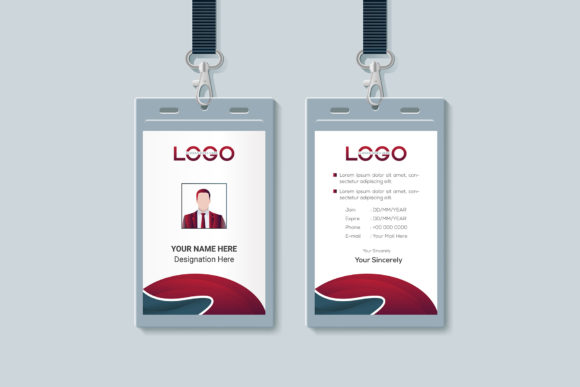
Ultimately, the decision to use a specific template depends on your unique requirements. Are you looking for a Creative and Clean Identity Card Template Vector Modern Creative and Clean Identity Card Template for a startup that values minimalism? Or do you need a robust solution for a large corporation requiring strict adherence to security protocols? There is no one-size-fits-all answer, but understanding the nuances of design helps you navigate the market effectively.
By avoiding common pitfalls like poor resolution, illegible typography, and incompatible file formats, you can ensure that your identification cards serve their intended purpose professionally. Whether you are designing for a small team or a global enterprise, the investment in a well-crafted template pays dividends in brand perception and operational efficiency. Take the time to review the assets, understand the technical constraints, and utilize the available resources, such as free fonts and vector tools, to create something that truly represents your organization.
If you encounter any challenges during the customization process, remember that support is often available. Feel free to contact experts or community forums for assistance. With the right approach and a solid template foundation, you can produce ID cards that are not only visually stunning but also highly functional and secure.