Modeling Comp Card Template: A Comprehensive Evaluation for Professional Portfolios
In the competitive landscape of the fashion and modeling industry, a model's portfolio is their most critical asset. At the heart of this portfolio lies the comp card, also known as a zed card or composite card. This document serves as a business card for models, providing casting directors, photographers, and agents with a quick, comprehensive overview of their look, measurements, and contact information. For professionals seeking efficiency without compromising on quality, the Modeling Comp Card Template offers a robust digital solution designed to streamline the creation process.
This article evaluates the utility of these templates, specifically focusing on those compatible with Photoshop, Photoshop Elements, and Microsoft Word. It explores who benefits most from this tool, the technical specifications involved, and how it fits into the broader workflow of a modern model or agency.
Understanding the Modeling Comp Card Template
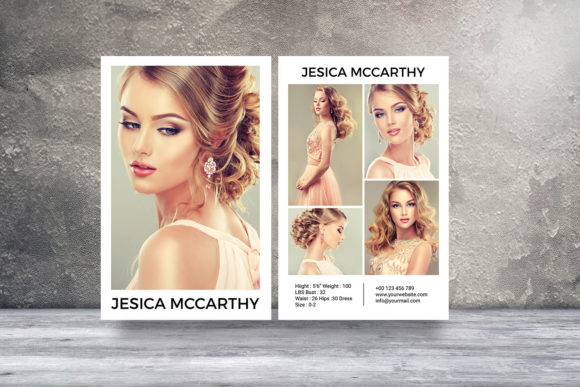
A modeling comp card template is a pre-designed layout that allows users to insert their own photographs, text, and branding elements to create a professional standard print-ready file. Unlike generic document templates found in word processors, high-quality comp card templates are engineered with specific industry standards in mind. The product described here is an instant download package containing working files in PSD (Photoshop) and DOCX (Microsoft Word) formats.
The core value proposition of this template lies in its structure. It typically consists of two pages formatted to the standard 5.5 x 8.5-inch size, which is the industry norm for comp cards. The design utilizes CMYK color mode, ensuring that the colors printed on physical paper match the digital preview. With a resolution of 300 dpi and a 0.25-inch bleed included, the template is optimized for professional printing services, eliminating the need for manual adjustments regarding margins and color profiles.
Why Professionals Choose Specialized Templates
Models and agencies often face the challenge of balancing creative control with technical precision. Creating a comp card from scratch requires advanced graphic design skills and knowledge of print specifications. Using a dedicated Modeling Comp Card Template addresses several common pain points:
- Technical Accuracy: The template comes pre-configured with the correct dimensions, bleed areas, and color modes. This reduces the risk of costly printing errors caused by incorrect file settings.
- Time Efficiency: Instead of spending hours aligning grids and setting up layers, users can focus on selecting the best images and refining their bio data. The "instant download" nature of the product means access is immediate, allowing for rapid iteration.
- Professional Aesthetics: These templates are designed by professionals who understand current industry trends. They provide a clean, uncluttered layout that highlights the model's features rather than distracting from them.
Evaluating Software Compatibility and Workflow
The versatility of this template package is a significant factor in its appeal. By offering both Adobe Photoshop/Elements and Microsoft Word versions, the product caters to different levels of technical expertise and software availability.
For Photoshop Users: The inclusion of .psd files (compatible with CS6 and later) provides the highest level of flexibility. These files utilize smart objects, a feature that allows users to double-click a placeholder layer to replace the image while automatically maintaining the original size and aspect ratio. This is crucial for models who have multiple headshots and want to swap them out quickly without distorting the design. The font replacement is straightforward; users can select text with the text tool and input new fonts, provided they have the necessary typefaces installed.
For Microsoft Word Users: The .docx version offers a more accessible alternative for those who may not have access to Adobe Creative Cloud. While it lacks the granular layer control of Photoshop, it simplifies the editing process for basic text and image placement. This is particularly useful for beginners or freelance models managing their own portfolios who need a reliable tool without a steep learning curve.
Benefits and Tradeoffs of Template Usage
While the advantages are clear, it is essential to weigh the benefits against potential limitations to make an informed decision.
Key Benefits
- Cost-Effectiveness: Purchasing a single template is significantly cheaper than hiring a graphic designer for every update or creating a custom design from scratch.
- Consistency: Agencies often require all their talent to use a consistent format. Templates ensure that every model's card adheres to the same structural and visual standards.
- Editability: The inclusion of a help file and clear instructions ensures that even non-designers can successfully modify the document. The ability to change photos via the "Photo folder's layer" simplifies the workflow immensely.
Potential Limitations
The primary tradeoff involves customization constraints. While templates offer a solid foundation, they may not suit every unique brand identity. Models looking for highly avant-garde or bespoke designs might find standard layouts too rigid. Additionally, the reliance on specific software versions (CS6 or later for PSD) could be a barrier for users with outdated systems, though the Word alternative mitigates this issue.
Situational Fit: Who Should Use This?
The Modeling Comp Card Template is an ideal fit for several specific groups within the industry:
- Newcomers to the Industry: Models just starting their careers often lack the budget for custom design work. This template provides a professional-grade starting point at a fraction of the cost.
- Fashion Students: Individuals studying fashion management or modeling can use this tool to practice creating portfolios before entering the job market.
- Freelance Photographers: Photographers building portfolios for clients may use these templates to organize and present model test shots efficiently.
- Agencies with High Turnover: Agencies that frequently sign new talent benefit from the speed of updating existing cards using a standardized template system.
When Alternatives May Be Worth Considering
Despite its utility, a template may not be the right choice for everyone. Consider alternative approaches if:
- Unique Branding is Critical: If a model has a very specific niche or artistic direction that requires a one-of-a-kind layout, a custom design by a professional graphic designer would yield better results.
- Advanced Design Control is Needed: For users requiring complex masking, advanced typography manipulation, or intricate graphic effects beyond simple image swapping, a fully custom project in Photoshop or InDesign offers superior control.
- Collaborative Workflows: If the comp card needs to be edited by a team across different devices with strict version control requirements, cloud-based collaborative design tools might be more suitable than static downloadable files.
Practical Decision-Making Insights
To determine if this Modeling Comp Card Template aligns with your goals, consider the following checklist:
Do you have the necessary software? Ensure you have Photoshop CS6 or later, Photoshop Elements, or Microsoft Word installed. Without these, the files cannot be opened or edited effectively.
Are your images ready? The template relies on high-resolution photography. Since the files are set to 300 dpi, low-quality images will appear pixelated when printed. You must source professional headshots and body shots beforehand.
What is your timeline? If you need a comp card immediately for an upcoming casting, the instant download feature makes this option superior to waiting for a designer's schedule.
Do you value consistency over uniqueness? If your priority is having a clean, industry-standard document that looks professional without drawing attention to the design itself, a template is the logical choice.
Conclusion
The Modeling Comp Card Template represents a practical intersection of design efficiency and industry standards. By leveraging the power of smart objects in Photoshop and the accessibility of Microsoft Word, it empowers models to produce high-quality marketing materials independently. While it may not replace the need for bespoke design in every scenario, its balance of cost, ease of use, and professional output makes it a valuable resource for anyone navigating the modeling industry. Whether for a first-time model or an established agency streamlining their workflow, this template offers a reliable foundation for presenting talent to the world.