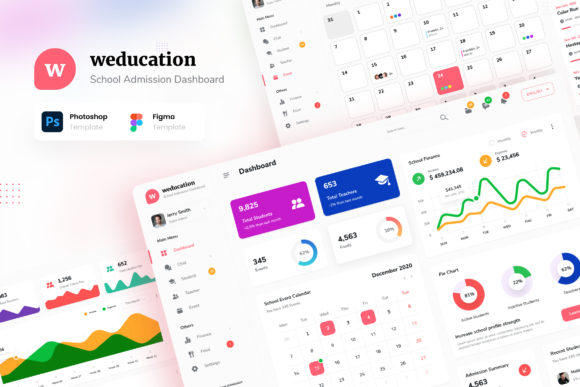
Weducation - School Admission Admin UI
Managing a school's digital presence requires more than just a functional website; it demands an interface that inspires trust and streamlines complex workflows. Weducation - School Admission Admin UI addresses this need by offering a comprehensive design system tailored for educational institutions. Whether you are building a platform for student registration, managing daily administrative tasks, or overseeing financial records, the right user interface can transform how your organization operates. This template provides the structural foundation needed to create a stunning and eye-catching dashboard without starting from scratch.
What Is Weducation - School Admission Admin UI?
At its core, this template is a collection of 12 high-quality screens designed in both PSD and Figma formats. It serves as a blueprint for creating modern admin dashboards specifically for schools. The design focuses on clarity and efficiency, ensuring that users can navigate through critical data points with ease. A standout feature is the inclusion of both Light and Dark color modes. This flexibility allows administrators to choose a visual style that reduces eye strain during late-night grading sessions or one that feels bright and energetic for morning operations.
The template includes dedicated pages for essential school functions. You will find specific layouts for the Dashboard, Student management, Teacher profiles, Events scheduling, Finance tracking, and even a Food page for cafeteria management. By separating these distinct areas into well-defined screens, the design prevents information overload. Each screen is built using free fonts from Google Fonts, ensuring that the typography remains clean, legible, and consistent across all devices. The files are set to a standard 1920px width, providing ample space to display charts, lists, and forms without feeling cramped.
Why Different Audiences Care About This Design
The value of a UI template often depends on who is using it. For some, it is about speed; for others, it is about customization or cost-effectiveness. Understanding these varying priorities helps determine if Weducation - School Admission Admin UI fits your specific project goals.
For Beginners and Hobbyists
If you are new to web design or are working on a school project as a hobbyist, the barrier to entry can be intimidating. You might worry about whether you have the skills to create a professional layout from scratch. This template lowers that barrier significantly. Because it comes with well-documented files and uses industry-standard tools like Adobe Photoshop and Figma, beginners can easily inspect the layers to learn how professional designers structure their work. You do not need to be an expert to start editing. You can simply open the file, replace the placeholder text with your own content, and swap out images to see immediate results. This hands-on approach turns a static template into a valuable learning tool.
For Professionals and Freelancers
Freelance developers and UI/UX professionals often face tight deadlines when bidding on education-related projects. Time is money, and starting a dashboard design from zero can eat up billable hours. For these users, the primary priority is efficiency. Weducation - School Admission Admin UI offers a head start by providing pre-built, high-fidelity screens. Instead of spending days wireframing and polishing buttons, a professional can focus on integrating backend logic and customizing the branding to match a client's identity. The availability of both PSD and Figma formats ensures compatibility with various workflows, allowing teams to collaborate seamlessly regardless of their preferred software.
For Educators and School Administrators
School owners and IT administrators are often the decision-makers behind purchasing such templates. Their perspective differs from the designer; they care about usability and reliability. They need a system where teachers can quickly update student grades, finance officers can track tuition payments, and event coordinators can manage schedules without confusion. The modern and clean design of this template supports this goal by organizing complex data into intuitive interfaces. When the interface is logical, the staff spends less time navigating the system and more time doing their actual jobs. The inclusion of a dark mode is particularly relevant here, as many school staff work long hours and appreciate reduced screen glare.
For Entrepreneurs and Small Business Owners
Entrepreneurs launching private schools, tutoring centers, or educational startups often operate with limited budgets. They need solutions that offer high commercial value without breaking the bank. Buying a complete UI kit is often more cost-effective than hiring a full design team. These users evaluate the template based on its potential to scale. Since the design is customizable, a startup can launch a basic version and later expand features as they grow. The documentation provided helps them understand what is included, ensuring they know exactly what assets they are investing in.
Evaluating Quality and Flexibility
When selecting a template, it is crucial to look beyond the visual appeal and consider the technical details. One of the most significant advantages of Weducation - School Admission Admin UI is its emphasis on customization. The fact that all images are used for preview purposes only means that the final product is entirely yours to shape. You are not locked into stock photography or generic icons. This flexibility allows you to inject your brand's personality into the application, making it feel unique rather than like a cookie-cutter solution.
The separation of files is another practical consideration. With 12 main pages covering everything from student admission to food services, the template covers the lifecycle of a typical school day. However, having these organized as separate pages allows developers to pick and choose which modules to implement. If a small preschool does not need a complex finance page immediately, they can omit it without cluttering the codebase. This modularity contributes to the long-term usefulness of the template, as it can adapt to different types of educational institutions, from large universities to small daycare centers.
Making the Right Choice for Your Project
Ultimately, the decision to use this template should align with your current skill level and project requirements. If you are looking for a quick way to prototype a school portal, the modern aesthetic of this design will impress stakeholders. If you are building a production-ready application, the clean code structure and documentation will save you weeks of development time. The dual availability in Light and Dark modes adds a layer of professionalism that users expect in modern web applications.
Remember that while the template provides the visual framework, the success of your project still depends on how well you integrate it with your specific needs. Take the time to review the PDF documentation to understand the file organization. Experiment with the color schemes to see which mode best suits your audience. Whether you are a beginner learning the ropes, a freelancer delivering a client project, or an educator improving your school's digital tools, Weducation - School Admission Admin UI offers a solid foundation to build upon.
By choosing a design that prioritizes clarity and ease of use, you ensure that the technology serves the people using it, rather than the other way around. This alignment between human needs and digital tools is what makes a dashboard truly effective. As you explore the 12 screens included in the package, consider how each element can be adapted to solve real-world problems in your educational environment.