Tixia - Ticketing Admin Dashboard UI
Managing the complex flow of event data, from initial booking to post-event reviews, requires a system that is as dynamic as the events themselves. Tixia - Ticketing Admin Dashboard UI serves as a comprehensive design solution tailored for professionals who need to visualize and control ticketing operations with precision. Whether you are organizing a massive concert series or a local community workshop, the interface provided by this template offers a structured yet flexible environment to handle orders, customers, and analytics without getting lost in clutter.
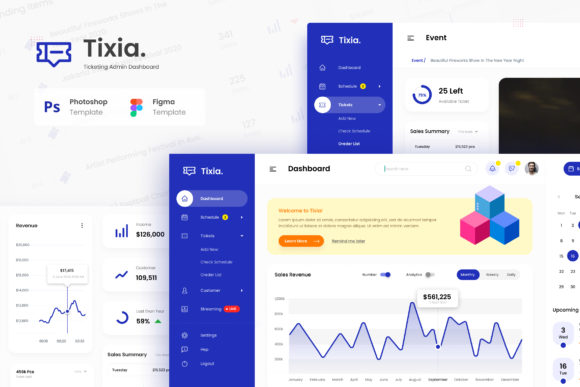
The core value of Tixia lies in its ability to transform raw data into actionable insights through a modern User Interface design. It is not merely a collection of static screens; it is a functional blueprint that supports the entire lifecycle of an event order. By providing six unique and modern User Interface screens in both PSD and Figma formats, the template ensures that designers and developers can create stunning and eye-catching admin dashboards that stand out in a crowded digital marketplace.
A Tool for Every Skill Level
One of the most significant advantages of using the Tixia template is its adaptability across different levels of technical expertise. For beginners entering the world of web design or dashboard development, the inclusion of well-documented files and free Google Fonts removes many of the traditional barriers to entry. You do not need to be a graphic design expert to start building a professional-looking admin panel. The 1920px width pages ensure that your designs look sharp on modern monitors right from the start, allowing novices to focus on learning layout principles rather than struggling with pixel-perfect alignment.
For experienced users and seasoned professionals, the flexibility of the source files is what matters most. The template includes main files in both PSD and Figma format, which are industry standards for editing and prototyping. This dual-format approach allows for seamless collaboration between designers and developers. A professional might appreciate the organized layers in the Photoshop files for creating high-fidelity mockups, while also utilizing the interactive components in Figma to build prototypes that stakeholders can click through before a single line of code is written.
Practical Applications for Creators and Entrepreneurs
Creatives and entrepreneurs often wear multiple hats, juggling marketing, product management, and customer support simultaneously. For these individuals, the time saved by using a pre-built, high-quality UI kit is invaluable. Instead of spending days sketching out wireframes or debating color palettes, they can immediately deploy the Tixia dashboard to visualize their product.
- Event Organizers: Can use the Order Page List and Customers page to track sales trends in real-time, ensuring they have the data needed to make quick decisions during peak booking periods.
- Concert Promoters: Might rely heavily on the Analytics page to understand audience demographics and purchasing behaviors, helping them tailor future marketing campaigns effectively.
- Small Business Owners: Can utilize the Review page to monitor customer feedback directly within their admin panel, fostering a culture of continuous improvement and customer satisfaction.
Each screen in the Tixia suite addresses a specific pain point in the ticketing workflow. The Event Detail page allows for easy management of session information, while the Dashboard provides a high-level overview of key performance indicators. This specificity means that users are not overwhelmed by generic features but are instead presented with tools designed specifically for the nuances of ticketing and event management.
Evaluating Quality and Usability
When selecting a UI template, the priority often shifts between ease of use, cost, quality, and long-term usefulness. Tixia balances these factors by offering a robust package that prioritizes clarity and efficiency. The design philosophy behind the template emphasizes a clean aesthetic that reduces cognitive load, allowing administrators to find the information they need quickly.
Ease of Use: The documentation provided with the template is a critical component of usability. Well-documented files mean that even if a user encounters a hurdle, there is guidance available to resolve it. This reduces frustration and accelerates the development process, making it a practical choice for tight deadlines.
Flexibility and Customization: While the default design is modern and polished, the true power of Tixia comes from its editability. Using Adobe Photoshop and Figma, users can easily customize colors, typography, and layouts to match their brand identity. This flexibility is essential for businesses that require a unique visual presence to differentiate themselves from competitors.
Commercial Value: For freelancers and agencies, the ability to deliver a "stunning and eye-catching" admin dashboard quickly can be a significant selling point. Clients expect their internal tools to be just as polished as their public-facing websites. By incorporating Tixia into their workflow, service providers can offer a higher standard of delivery, potentially commanding better rates and building stronger client relationships.
Considerations for Educators and Hobbyists
It is worth noting that the utility of Tixia extends beyond commercial applications. Educators teaching UI/UX design or web development can use this template as a case study for students. Analyzing the structure of the six unique screens—Dashboard, Order Page List, Event Detail, Customers page, Analytics page, and Review page—provides a concrete example of how information architecture works in a real-world scenario.
Hobbyists interested in building their own event platforms can also benefit from the template. They can experiment with the design elements, learn how to organize data visually, and gain confidence in their design skills without the pressure of starting from scratch. The use of free fonts further lowers the barrier to experimentation, ensuring that the final output looks professional regardless of the budget.
Understanding the Scope and Limitations
To make an informed decision, it is important to understand exactly what is included in the Tixia package. The main files consist of six pages in PSD and Figma format, along with PDF documentation. These files cover the essential views required for a complete ticketing admin system. However, potential users should be aware that all images used in previews are for demonstration purposes only and are not included in the main download.
This distinction is crucial for managing expectations. Users will receive the structural and design assets necessary to build the interface, but they will need to source their own placeholder images or integrate live data feeds. This requirement actually adds to the template's value, as it encourages users to engage with the content creation process rather than relying solely on stock assets. It forces a deeper understanding of how the design accommodates real-world data variations.
The emphasis on 1920px width pages ensures that the design is optimized for desktop environments, which is where most administrative tasks take place. While mobile responsiveness is a common concern, the primary focus of this template is on delivering a powerful desktop experience. For organizations where the majority of ticket management happens at a desk, this focus ensures that every element is large enough to interact with comfortably and clear enough to read without strain.
Making the Right Choice for Your Project
Ultimately, deciding whether Tixia - Ticketing Admin Dashboard UI fits your needs depends on your specific goals. If you are looking for a generic dashboard that can be applied to any business type, there may be more specialized options available. However, if your project involves event ticketing, order management, or customer relationship tracking, the specialized nature of this template becomes a distinct advantage.
The combination of modern design aesthetics, practical functionality, and ease of customization makes it a strong candidate for anyone looking to elevate their admin interface. Whether you are a beginner eager to learn, a professional seeking efficiency, or a creator wanting to showcase your work, the Tixia template provides a solid foundation. By leveraging the six high-quality screens and the freedom to edit them in your preferred software, you can create a dashboard that not only looks impressive but also functions seamlessly to support your operational needs.
In a digital landscape where user experience defines success, having a tool that simplifies the complex task of dashboard design is a strategic asset. Tixia offers that asset, bridging the gap between complex data requirements and intuitive visual presentation. As you evaluate your options, consider how much time you can save and how much quality you can gain by starting with a template built specifically for the demands of ticketing and event administration.